


Hello Friends, Want to Download Latest Version of Free Fire on your PC? Scroll the Complete article. You Know? there is a New Update (OB42) on 20 October 2023.
How to Download Free Fire OB42 Update on PC
If you want to enjoy the fast-paced action of Free Fire on your PC you’re in luck. While the game was designed for smartphones it’s entirely possible to download and play it on your computer. Here’s how:
1. Download an Android Emulator
To play Free Fire on your PC you’ll need to download an Android emulator. This software creates a virtual Android device on your computer allowing you to download and play mobile games. Some of the most popular emulators include BlueStacks NoxPlayer and LDPlayer.
2. Install the Emulator
After downloading your preferred emulator install it on your computer. It’s usually a simple process – just follow the prompts on your screen.
3. Set up the Emulator
Once the emulator is installed you’ll need to set it up to mimic an Android device. Sign in with your Google account just like you would on your smartphone. This will give you access to the Google Play Store where you can download Free Fire.
4. Download Free Fire
Open the Google Play Store on your emulator and search for Free Fire. Once you find it click “Download” and wait for the game to install.
5. Play and Enjoy
Once Free Fire is installed you can launch it and start playing. The controls will be a bit different than on your phone so it may take some getting used to. You can also customize your controls to suit your preferences.
Read Also: Free Fire Advance Server Apk for Android Download Link and Activation – Free Fire Community Forum
Read Also: MS Dhoni is Appointed to be the Brand Ambassador of Free Fire India – Free Fire Community Forum
How to Install Free Fire on PC
Once you have downloaded Free Fire for PC, you need to install it. The installation process is the same for both emulators and the Garena Free Fire website.
To install Free Fire for PC using an emulator, follow these steps:
- Open the emulator.
- Click on the “Play Store” icon.
- Search for “Free Fire”.
- Click on the “Install” button.
How to Play Free Fire on PC
Once Free Fire is installed, you can start playing the game. The controls for Free Fire for PC are similar to the controls for the mobile version of the game.
To move around, use the WASD keys. To aim and shoot, use the mouse. To use skills, press the corresponding hotkeys.
Read Also:
Tips and Tricks for Winning in Free Fire for PC
Here are some tips and tricks to help you win in Free Fire for PC:
- Land in a safe location. Avoid landing in hot spots, as these areas are often crowded with other players.
- Loot for weapons and gear. Once you have landed, start looting for weapons and gear. You will need these items to survive and win the game.
- Build strategies. Don’t just run around aimlessly. Develop strategies for attacking and defending.
- Be patient. Don’t rush into battle. Take your time and pick your shots carefully.
- Communicate with your teammates. If you are playing with friends, communicate with each other. This will help you coordinate your attacks and defend each other.
Conclusion
Free Fire for PC is a great way to enjoy the game on a larger screen and with better controls. With these tips and tricks, you can be on your way to winning your next match.
I hope this blog post helps you to learn more about Free Fire for PC. If you have any questions, please feel free to leave a comment below.

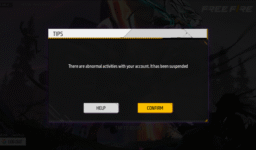
Please kari na meri I di and band kar do please mein Hi kar ke sath kya hal rahata hai please aaj ke bad yah sab kuchh nahin karunga please mein bahut medium Ghar se hun please
3770193008❤🎉🎉
😭3770193008❔I see that you’re talking about your Free Fire ID being suspended due to some issue. If your Free Fire account has been suspended, it’s typically due to violations of the game’s terms of service or community guidelines. These violations can include cheating, hacking, using unauthorized third-party software, or engaging in other forms of misconduct.
To address this issue and potentially have your account reinstated, you should contact Garena Free Fire’s customer support. You can typically find a “Contact Us” or “Support” section within the game’s settings or on their official website. Provide them with the necessary information and details about your account, and they will guide you through the process of resolving the suspension issue.
It’s important to remember that the decision to suspend or reinstate an account is at the discretion of the game’s developers, and it may take some time to resolve the matter. Be sure to cooperate fully with their support team and follow their instructions to have the best chance of resolving the issue.